AI Image Forensics & Authenticity Analysis
The platform uses computer analysis to check media. It does not just look at what the image looks like, it checks for signals that may show the image is not real. This includes things like:
- Synthetic image generation.
- Partial AI-assisted editing.
- Post-processing modifications.
- Format conversion artifacts.
- Structural inconsistencies.
The results are shown with a confidence level, which means how strong the signals are, not if the image's definitely real or not.
What This Tool Does
The tool checks the properties of an image not what it looks like or what it says. It uses automated techniques to find patterns that may show if an image was made by a computer, taken by a camera or changed digitally. The system checks technical signals, including how the pixels behave compression patterns and metadata characteristics. This helps us understand where the image came from. The analysis does not say for sure if an image is real or not. It gives us evidence. Helps us understand the context.
Why Image Forensics Matters Today
New AI tools can make realistic images easily. While these tools can be creative, they also make us worry about information and trust in digital media. Images are often shared without saying where they came from or if they are real. So, it is very important to check if an image shows signs of being made by a computer or changed. Photo forensics checks how an image was made, not how it looks. This helps us make decisions and use digital media responsibly.
How the Analysis Works
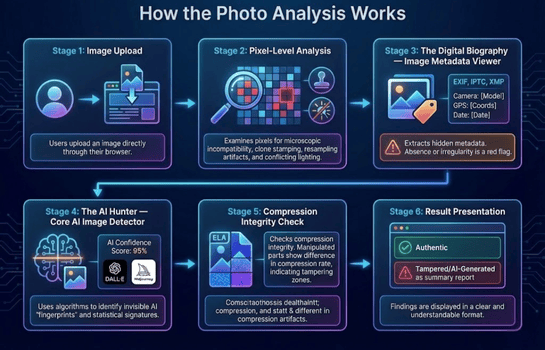
The AI Image Analyzer follows a step-by-step process inspired by forensic imaging workflows.
Stage 1: Image Upload
Users upload an image directly through their browser.
Stage 2: Pixel-Level Analysis
The system checks the pixels for patterns like resampling traces cloning artifacts and structural irregularities.
Stage 3: Metadata Examination
The system checks the metadata, like EXIF, IPTC and XMP for consistency and completeness. If metadata is missing it does not mean the image is fake. It can affect the confidence level.
Stage 4: Synthetic Pattern Evaluation
This stage checks for characteristics that are common in AI-generated images. The analysis checks for patterns and structural signals that may be linked to AI-generated content. If these characteristics are found the system reports a confidence level, not a conclusion.
Stage 5: Compression Integrity Check
The analysis checks the compression of the image to see if it is consistent. Edited or spliced regions may have compression behavior, which can highlight areas that need further review.
Stage 6: Confidence Context & Reporting
The findings are presented with a confidence level based on the strength of the signals.
Types of Signals Investigated
The system checks technical indicators, such as:
Visual Artifacts
There may be irregularities in the image that are not visible to the human eye like repeating textures or jagged edges.
Compression Behavior
Images that have been edited or changed may have compression patterns.
Metadata Characteristics
All image files have hidden information like the camera used or the time of creation. Discrepancies in this information may raise suspicions of image tampering.
Editing Traces
Signs of cropping, resizing or enhancement may show how an image has been changed.
Structural Consistency
The system checks the noise in the image to see if it is consistent.
Image Forensics in Practice
Newsroom Image Verification
A news editor uses an image checker to verify an image before publishing it. The analysis showed that the image was not taken by a camera. Later, review indicated that the image was made by a computer.
Academic Media Research
A university researcher uses an image verification tool to compare AI-generated images with camera photographs. The analysis supported studies on media literacy and AI transparency.
Identify Synthetic Images for Brand Safety
Social media managers use image tools to highlight fake images and unusual patterns. Technical assessment guides verification and responsible responses helping protect brand reputation.
Verify Images Online for Everyday Users
User can verify images using an image authenticity tool. Through the analysis of image metadata editing traces and image compression individuals can gain information on image authenticity.
Understanding Confidence and Limitations
All results are probabilistic, not absolute. Confidence reflects how consistently technical indicators align across the image. Several real-world factors can influence confidence levels, including image recompression or resizing metadata removal and heavy enhancement. Results should always be interpreted alongside information and additional verification when needed. The analysis follows practices commonly used in media verification and digital integrity studies.
Responsible Use and Interpretation
The AI Image Analyzer is designed to assist evaluation. It does not establish authorship or legal authenticity. Highlighted indicators represent signals that may warrant closer review. They should not be interpreted as claims, especially in formal or high-stakes contexts. Human judgment and contextual verification remain components of responsible media analysis.
Privacy and Data Handling
This tool handles user data privately. Uploaded images are processed for analysis and are not stored or shared. Files are analyzed in real time and are automatically removed after processing. No user accounts are. Uploaded images are not associated with personal identities or profiles. For details on data handling and security practices please refer to the Privacy
Policy.
Frequently Asked Questions
How accurate are the analysis results?
The platform is designed to improve reliability by examining multiple technical indicators rather than
relying on a single signal. Pixel behavior, metadata consistency, compression patterns, and AI-related
characteristics are reviewed together to provide context.
Because image processing methods and AI models continue to evolve, absolute accuracy cannot be guaranteed.
Results are best understood as technical observations that support further review.
How does the analysis distinguish between AI-generated and camera-captured images?
AI-generated images often exhibit technical patterns related to model training, synthesis methods, and
diffusion processes. These may differ from the noise characteristics, color variation, and sensor behavior
commonly found in camera-captured images.
The analysis evaluates these differences as part of a broader technical review. Findings reflect likelihood
and consistency of indicators rather than definitive classification.
Can the system really detect modified AI images?
The system is designed to identify technical patterns that may be associated with AI-assisted modifications.
These observations can help highlight areas that warrant additional review, especially when AI tools are
used selectively within an image.
What types of image modifications can the analysis highlight?
The analysis can highlight indicators commonly associated with digital edits such as face replacements,
background changes, object insertion, enhancement, or generative fills. These indicators may arise from both
AI-assisted tools and traditional editing software.
The presence of such signals does not automatically confirm manipulation. Results are intended to support
closer inspection and contextual review.
Can the system detect images that combine AI and human elements?
The analysis can highlight technical patterns that may be associated with partial AI-assisted changes within an image. These findings are intended to support closer inspection rather than confirm authenticity.
Can this free online tool identify which AI model created an image?
The analysis may highlight technical patterns associated with AI usage, even when the exact generator cannot be determined.
How does the analysis handle images created using newer or unfamiliar AI models?
When an image appears to contain characteristics associated with AI generation, the analysis may highlight those patterns even if the specific model is not recognized. Many generative systems share underlying statistical behaviors that differ from camera-based imagery.
In such cases, results emphasize observed indicators rather than model attribution. Confidence levels may be lower when reference data is limited.
Is my image data stored or shared?
No. All uploaded images are processed in real time and automatically deleted after analysis. The system does not save, share, or reuse your files for training or research. Privacy is a core part of this platform, and all data remains fully confidential throughout the entire process.
How long does the forensic analysis take?
Most analyses are completed within a few seconds. Processing time may increase for high-resolution images or complex edits, depending on the amount of data being examined.
What image formats does the platform support?
The tool accepts a wide range of formats—JPG, PNG, SVG, WebP, BMP, TIFF, and HEIC—and fully supports high-resolution and metadata-embedded images.
Important Notice
This tool is for informational and educational purposes only. It does not constitute legal advice, establish
authorship, or determine intent in any manner. For formal validation, professional consultation is advised.